Build Your Email List from Your Ticketing Page
Countdown Clock Reminder Contents
For most of the year, your ticket sales are closed. People interested in coming to your rodeo can’t immediately buy tickets when the idea strikes them, and you might be missing out on sales.
Turn this challenge into a competitive advantage by adding a countdown clock and a spot to enter an email.
Countdown Clock Reminder
Get the most out of your sales opening day by letting people sign up for an automated email reminder. Displaying a countdown clock also helps your prospective attendees plan their future ticket purchases.
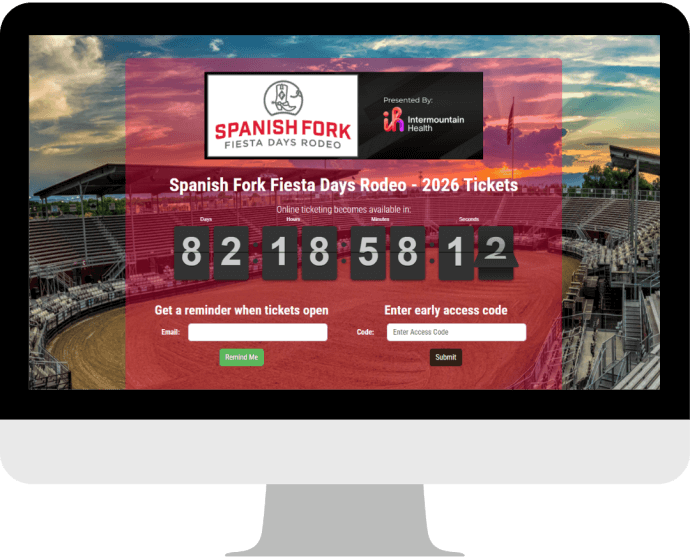
Everyone who signs up for an email reminder receives an automated notification when sales open. You don’t even have to craft a special email. Your sales just have to have opened.
This tool also helps you build your email list, which will help you with marketing initiatives now and in the future.
Ticket Orders
Of course, you’ll also build your email list from each ticket order placed. Rodeo Ticket’s system stores the email addresses from abandoned orders and completed orders, so you can target your marketing and communications to the two different groups.
The first year of your rodeo is the hardest because each sale is brand new. The next year is easier because you’ll have an email list and continue to grow it with more sales.
Ticketing Page Email List Value
Building your email list from your ticketing page makes your list highly valuable. Everyone on your list was interested enough in your rodeo to request a notification when sales opened, start an order, or buy tickets.
All of those people are much more likely to buy tickets again, so you can keep your audience coming year after year. It’s much easier to retain your attendees than to find new ones.
Email List Marketing Strategy
Once you have an email list, create an email marketing strategy.
For example, you might email all of last year’s incomplete orders the day before sales open. Create a sense of urgency and capitalize on what they missed at last year’s rodeo.
You can send a similar email to all of last year’s attendees the day before sales open. Instead of focusing on what they missed, remind them about the great moments they had last year. Helping people remember special moments encourages them to come again.
You can use Rodeo Ticket's free emailer to implement your strategy.
Check out our top email marketing strategies.